Guide · sizes
App Store screenshot sizes, and the two that are required.
Apple's requirements changed, and many guides still say 6.9-inch. Here's every size from Apple's own table, what you really have to make, and a tool to check a file.
Runs in your browser on a computer · No card until you export
In short
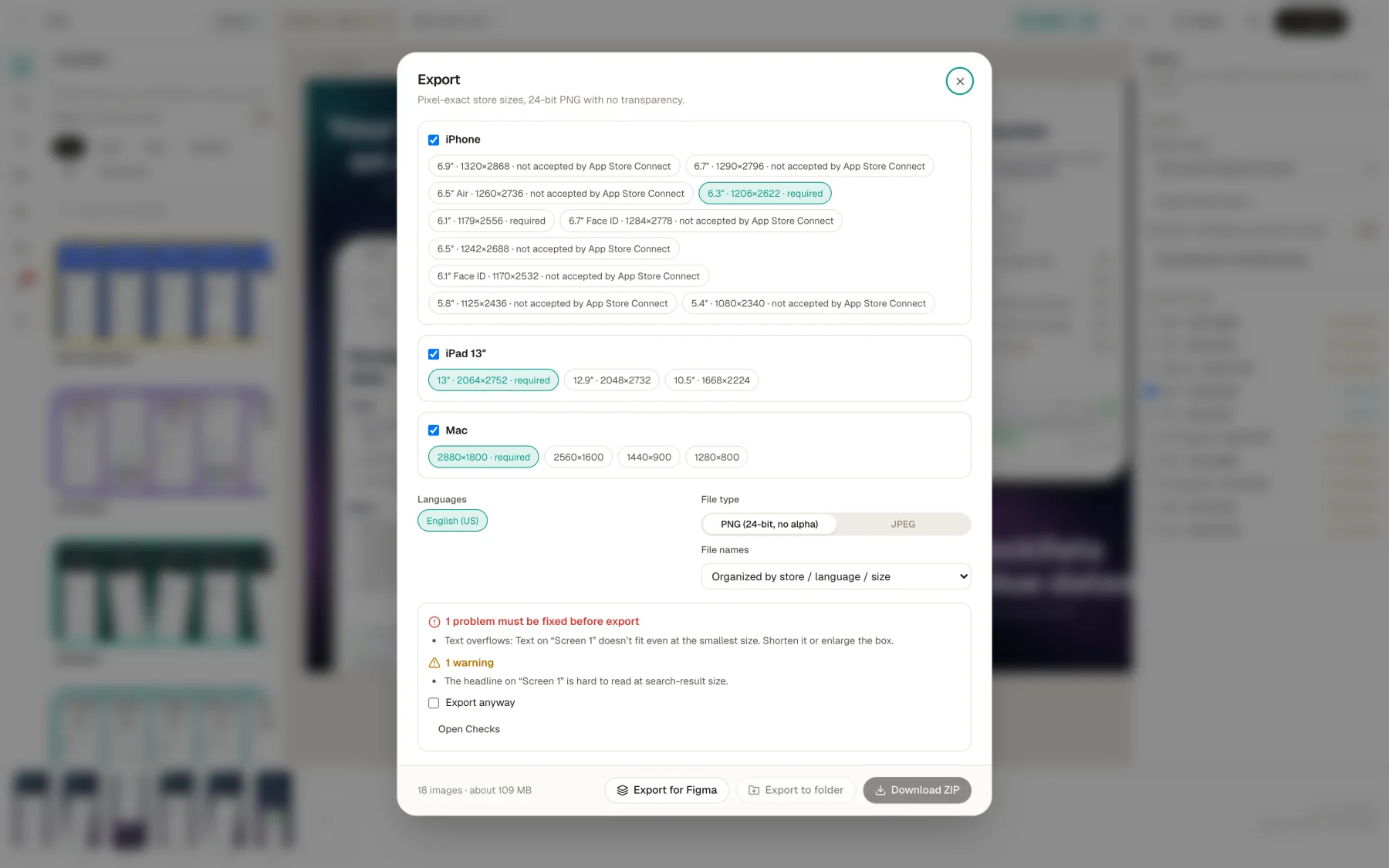
For iPhone, Apple requires at least one screenshot for the Dynamic Island medium display: 1206 × 2622 or 1179 × 2556 pixels. If your app runs on iPad, it also requires the 13-inch display: 2064 × 2752 or 2048 × 2732. Each set takes 1 to 10 images in .jpeg, .jpg or .png, with no alpha. Mac apps need one of four 16:10 sizes. Checked against Apple's table on November 4, 2026.
- iPhone (required)
- 1206 × 2622 or 1179 × 2556
- iPad 13″ (if it runs on iPad)
- 2064 × 2752 or 2048 × 2732
- Mac (for Mac apps)
- 2880 × 1800, 2560 × 1600, 1440 × 900 or 1280 × 800
- Files
- 1 to 10 per size; .jpeg, .jpg, .png; no alpha
On this page
What you have to make
| Device | Apple's name for it | Portrait pixels | When |
|---|---|---|---|
| iPhone | iPhone with Dynamic Island (medium display) | 1206 × 2622 or 1179 × 2556 | Required |
| iPad | iPad 13-inch display | 2064 × 2752 or 2048 × 2732 | Required if your app runs on iPad |
| Mac | Mac | One of four 16:10 sizes | Required for Mac apps |
That's from Apple's screenshot specifications. If your interface is the same across devices and languages, these are all you need: App Store Connect scales them down for smaller displays.
About 6.9-inch. Many guides still say 1320 × 2868 is the one to make. Apple's table now lists it under the Dynamic Island large display, and names the medium display as the required one. When we checked App Store Connect on November 2, 2026, the iPhone slot was the medium display, and it took only those two sizes.
Check a file
Drop in a PNG or JPEG. This reads its pixel size and whether it has an alpha channel, and tells you where it fits. The file stays in your browser and isn't uploaded.
Every iPhone size
| Apple's class | Covers | Portrait | Landscape |
|---|---|---|---|
| Dynamic Island (large) | iPhone Air; 18, 17, 16, 15, 14 Pro Max; 16 and 15 Plus | 1320 × 2868 1290 × 2796 1260 × 2736 | 2868 × 1320 2796 × 1290 2736 × 1260 |
| Face ID (large) | 14 Plus; 13, 12, 11 Pro Max; 11; XS Max; XR | 1284 × 2778 1242 × 2688 | 2778 × 1284 2688 × 1242 |
| Dynamic Island (medium) | 18, 17, 16, 15, 14 Pro; 17, 16, 15 | 1206 × 2622 1179 × 2556 | 2622 × 1206 2556 × 1179 |
| Face ID (medium) | 17e, 16e, 14; 13 and 12 family; 11 Pro; XS; X | 1170 × 2532 1125 × 2436 1080 × 2340 | 2532 × 1170 2436 × 1125 2340 × 1080 |
| Home Button (large) | 8, 7, 6S, 6 Plus | 1242 × 2208 | 2208 × 1242 |
| Home Button (medium) | SE 3rd and 2nd gen; 8, 7, 6S, 6 | 750 × 1334 | 1334 × 750 |
| Home Button (4″) | SE 1st gen; 5S, 5C, 5 | 640 × 1136 640 × 1096 no status bar | 1136 × 640 1136 × 600 no status bar |
| Home Button (3.5″) | 4S, 4 | 640 × 960 640 × 920 no status bar | 960 × 640 960 × 600 no status bar |
| iPhone Duo (outer) | iPhone Duo | 1398 × 2034 | 2034 × 1398 |
| iPhone Duo (inner) | iPhone Duo | 2007 × 2853 | 2853 × 2007 |
Apple says iPhone Duo screenshots will be required from April 2027 for any app using the iOS 27.1 SDK or later.
Every iPad size
| Apple's class | Covers | Portrait | Landscape |
|---|---|---|---|
| 13″ display | iPad Pro (M5, M4) and 6th to 3rd, 1st gen; iPad Air (M4, M3, M2) | 2064 × 2752 2048 × 2732 | 2752 × 2064 2732 × 2048 |
| 12.9″ display | iPad Pro 2nd gen | 2048 × 2732 | 2732 × 2048 |
| 11″ display | iPad Pro and Air; iPad (A16, 10th); iPad mini (A17 Pro, 6th) | 1668 × 2420 1668 × 2388 1640 × 2360 1488 × 2266 | 2420 × 1668 2388 × 1668 2360 × 1640 2266 × 1488 |
| 10.5″ display | iPad Pro; iPad Air 3rd; iPad 9th to 7th | 1668 × 2224 | 2224 × 1668 |
| 9.7″ display | Older iPad, Air and mini models | 1536 × 2048 768 × 1024 | 2048 × 1536 1024 × 768 |
The 9.7-inch class also takes each size without the status bar: 1536 × 2008 and 768 × 1004 in portrait, 2048 × 1496 and 1024 × 748 in landscape.
Mac
One of 1280 × 800, 1440 × 900, 2560 × 1600 or 2880 × 1800, all 16:10. More on Mac App Store screenshots.
Header and search images
| Placement | Ratio | Pixels | Files |
|---|---|---|---|
| Product page header | 21:9 | 3840 × 1646 | .jpeg, .jpg, .png |
| Search results | 3:2 | 1920 × 1280 to 3840 × 2560 | .jpeg, .jpg, .png |
| Header or search, universal | 16:9 | 5244 × 2950 | .png |
New in iOS 27 and iPadOS 27. From Apple's creative assets specifications. How to make them.
Apple TV, Vision Pro and Apple Watch
| Device | Pixels | When |
|---|---|---|
| Apple TV | 1920 × 1080 or 3840 × 2160 | Required for Apple TV apps |
| Apple Vision Pro | 3840 × 2160 | Required for Vision Pro |
| Apple Watch Ultra 4, 3 | 422 × 514 | Required for Watch apps (one size for all) |
| Apple Watch Ultra 2, Ultra | 410 × 502 | |
| Apple Watch Series 12, 11, 10 | 416 × 496 | |
| Apple Watch Series 9, 8, 7 | 396 × 484 | |
| Apple Watch Series 6, 5, 4; SE | 368 × 448 | |
| Apple Watch Series 3, 2, 1 | 312 × 390 |
Listed for completeness. Appscreensii doesn't make these sets. For Apple Watch, you must use the same size across all your languages.
How scaling works
If you don't provide a class, App Store Connect uses a scaled version of another. Apple's table spells out the chain:
- Dynamic Island large and Face ID large fall back on each other.
- Dynamic Island medium falls back to Face ID large.
- Face ID medium falls back to Dynamic Island medium.
- Home Button large falls back to Face ID medium, and each smaller Home Button class falls back to the next one up.
- iPad 12.9-inch and 11-inch fall back to 13-inch. 10.5-inch falls back to 12.9-inch, and 9.7-inch to 10.5-inch.
You can still upload a set made for a particular size if the interface differs, or if you want a text size that reads better there.
File rules
- At least 1 and up to 10 screenshots per device size.
- .jpeg, .jpg or .png.
- No alpha channels or transparency.
- Depending on orientation, up to three can appear in search results.
If an upload is refused, the size and alpha are the first things to check. See why uploads get refused.
Exporting these sizes
Appscreensii's export lists the sizes for each set, marks which are required, and says when App Store Connect won't take one. It designs at a large size and draws each export from the design, so one project gives you all of them. PNGs are 24-bit with no alpha.
Store rules checked November 4, 2026, against Apple's and Google's own pages. They change, so check the source before relying on any one number.
Questions
Good to know.
What size should App Store screenshots be?
For iPhone, 1206 × 2622 or 1179 × 2556, the Dynamic Island medium display Apple now requires. For iPad, if your app runs there, 2064 × 2752 or 2048 × 2732. For Mac, one of four 16:10 sizes up to 2880 × 1800.
Do I still need 6.9-inch screenshots?
Apple's table no longer names it as required: it lists 1320 × 2868 under the large Dynamic Island display, and asks for the medium display. You can still provide a large set if you want those exact sizes.
Do I need a set for every iPhone size?
No. If your interface is the same across sizes and languages, provide the required size and App Store Connect scales it down.
How many screenshots can I upload?
Up to 10 per device size, with at least one.
Can App Store screenshots be transparent?
No. Apple says images can't include alpha channels or transparencies. Save as a PNG without alpha, or as a JPEG.
Keep reading
More on store screenshots.
Your store page is the first thing people see.
Drop in your screenshots and see them in every template, right now.
Get started